Monday, March 18, 2013

Semesters are Coming


The first semester at Rochester Institute of Technology is almost here.


Shopping carts will open up next week and students for the first time will be adding semester classes to their carts. This will be a change because for the majority of students, there will only be two enrollment periods per year (the exceptions will be the summer term and the intercession in January). An important note is that before a student can enroll in classes (on their enrollment point), they must complete their IAP. Most students have completed these documents; however, there is a portion of students that have not met with their advisor.

Fall 2013-14 Enrollment Dates are as followed:


Enrollment Day


Enrollment Population


Enrollment appointments will be assigned randomly but will occur on this date.
Day 1
·         Graduate Students
·         Early 5th year students*
·         Early 4th year in a 4 year program students*
Monday, April 15, 2013
Day 2
·         5th year students
·         4th year students in a 4 year program
·         Early 4th year students in a 5 year program*
Tuesday, April 16, 2013
Day 3
·         4th year students in a 5 year program
·         Early 3rd year students*
Wednesday, April 17, 2013
Day 4
·         3rd year students
·         Early 2nd year students*
Thursday, April 18, 2013
Day 5
·         2nd year students
·         Early 1st year students*
Friday, April 19, 2013
Day 6
·         1st year students
Monday, April 22, 2013
Day 7
·         Non-degree students and all open enrollment
Tuesday, April 23, 2013

*Be sure to check what date your enrollment appointment is go to your Student Center.
**To see your appointment time, you will need to click on the details link under the Enrollment Dates section. 

Monday, March 11, 2013

How Many Classes Can I Take?

With semesters approaching at Rochester Institute of Technology, there are a lot of little things students will need to learn.  We can start with the number of classes and units students can enroll in per semester.

Current students that will be enrolled at RIT through the transition from quarters to semesters will need to speak with their advisors and complete an IAP. This should be completed before March 15th as shopping carts for Fall 2013-14 are set to open March 26th. Students will be able to add classes to their carts without having their IAP completed; however, they will not be able to enroll on their enrollment appointment.

Here are the basics regarding semester units:

  • The minimum number if units a undergraduate student can take and be considered full-time is 12.
  • The minimum number of units a graduate student can take to be considered full-time is 9.
  • The maximum number of units an undergraduate student can take without special permission is 18.
  • Classes will typically carry a weight of 3 units.
  • The average number of units a student is projected to take per semester is 15 which is the equivalent of 5 classes.
  • Honors students will have the ability to enroll in up to 25 units per semester without special permission.

Rochester, NY


Monday, March 4, 2013

ABC Search

Students have been talking for the past year about the SIS class search. Why doesn't the alpha system work? Why can't I search by course name in the search? Why can't I search by my major? Now we have the answer. We have been waiting for semesters to format the systems to search by category name instead of the four-digit number code. There will be 4 letter alpha codes in semesters instead of the 4 digit numeric codes used for quarter classes.

If you need help finding these codes you have a few options:

  •  Advisors will have a list of these new codes
  • You can check the full list online
  • Go to Student Center. Then click the search link and select the select subject button. From here you can use the academic group drop-down menu and filter course subject codes by college.  Below is a visual guide to these steps. Make note of the differences from the quarter class selection.

Step One: Go to your student center main page and select - Search 


Step Two: On the search for classes page, change the term to Fall 2013-14.  Then hit the Select Subject Button. 

Step Three: All courses will now be able to be found by subject, not the old course codes. 

Step Four: You will notice that the old four digit course codes will not work.


The system is becoming more and more user friendly and we have every intention to continue improving the system for RIT faculty, staff, and students.

Monday, December 24, 2012

When do I pay my Spring bills?

We know students do not always like to think about their bills but we wanted to make sure that students were aware of the payment periods for Spring Quarter.


Statements for Spring will be generated on February 1st, 2013 and the following are the bill paying options:
Option 1: February 15, 2013
Option 2: February 15 and March 15
Option 3: February 15 and March 15 and April 15

Students or bill payers can make payments in the following way:


1. On-line at https://eservices.rit.edu using MasterCard or
Discover Card (through third party vendor). The vendor
charges a 2.55 percent service fee for each credit card
transaction.
2. On-line using the e-check option through the eServices site
(with no fee) at https://eservices.rit.edu
3. In person at the Student Financial Services Office:
Administrative Services Building, first floor, (check, money
order or cash).
4. By mail–using the printable payment form provided with
the eServices bill (check payment)

If for some reason a student requires a refund the following is the refund schedule for the Spring 2013:


*During first week of classes
(March 4 through March 10):
100% Refund 0% Charge

*During second week of classes
(March 11 through March 17):
70% Refund 30% Charge

*During third week of classes
(March 18 through March 24):
60% Refund 40% Charge

*During fourth week of classes
(March 25 through March 31):
50% Refund 50% Charge

*During fifth week of classes
(April 1 through April 7):
25% Refund 75% Charge

*During sixth week and subsequent weeks of classes
No Refund


For additional information on tuition charges, payment and
more, please refer to the Student Financial Services website at:
finweb.rit.edu/sfs.


Monday, December 17, 2012

Spring Enrollment has Almost Sprung!

I know we are just entering Week 4 at RIT but it is almost time to start thinking about your Spring Quarter schedule (for most of us it will be our last quarter at RIT with the transition to semesters next August).

The shopping carts for Spring Enrollment will be open before the end of Week 4, so while you are empty your holiday shopping carts you can start filling up your class shopping cart.  We want to continue to encourage students to use their shopping carts for pre-planning purposes.  Also make sure you have backups for classes that may fill up fast.

The following days are for Spring Enrollment:


Monday,  January 21
Graduate students
Early 5th-year students*
Early 4th-year students* in a 4-year program
Tuesday,  January 22
5th-year students
4th-year students in a 4-year program
Early 4th-year students* in a 5-year program
Wednesday,  January 23
4th-year students in a 5-year program
Early 3rd-year students*

Thursday,  January 24
3rd-year students
Early 2nd-year students*

Friday,  January 25
2nd-year students
Early 1st-year students*

Monday, January 28
1st-year students

Tuesday, January 29
Non-degree and all other students

If you have any questions be sure to use our Facebook, Twitter, blog, or contact the Registrar's Office or your advisor for help.  

Registrar’s and Student Financial Services Office Hours
Monday–Thursday 8:30 a.m. – 5:00 p.m.
Friday 8:30 a.m. – 4:30 p.m.

Saturday, December 15, 2012

Spring Schedules

You wanted it and now you can have it!

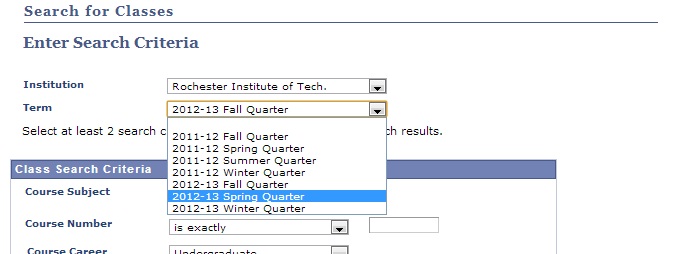
The Spring 2012-13 class schedule is up on Student Center. To find the schedule you can search in the class search and change the term to 2012-13 Spring Quarter. 

A few things to remember:
  • Some colleges and departments have not submitted schedules or all of their classes, this will come over the next few months.
  • Some classes do not have professors assigned yet; these will be assigned over the course of the next few months. 
  • Class times and professors and rooms are subject to change over the next few months.
  • You can not put classes for spring quarter in your winter quarter shopping cart. 
***It is never to early to start planning for the spring especially after our long Rochester winters.*** 

Wednesday, December 5, 2012

How do I Audit a Class?

Auditing....one of the questions on student's minds is, "How do I audit a class?"  For those of you that do not know what auditing is: auditing is primarily used in wellness classes and allows students to take a class without receiving a grade.  Most wellness classes are taken either as an audited course or on a pass/fail basis.

In the system you can choose to change the way a class is graded when you get to the course selection step. It is important to remember not all wellness classes are possible to be audited.   See the picture below for details on how to change the grading: 
Now comes the problem some students have with needing to edit classes after they have already enrolled.  In Student Center there is a solution to this without having to drop a class and re-enroll the way you wanted to.  Just follow these steps: 

Step 1: Click Enroll
Step 2: Select the appropriate term (if not already listed as the term for enrollment).

Step 3: Click on the Edit sub-tab.

Step 4: You will be taken to the Edit Class Enrollment Options screen.  Only classes that are available for edit (primarily wellness classes) will be available in the drop down box.  Once you have selected the class that you would like to edit, click "Proceed to Step 2 of 3".


Step 5: You will be taken to the Enrollment Options page where you will be able to change the way the class is graded.


Step 6: Click Next

Step 7: Click Finish Editing.


Hope that helps and make sure you stay tuned on the latest information and updates for Student Center!