We know students do not always like to think about their bills but we wanted to make sure that students were aware of the payment periods for Spring Quarter.
Statements for Spring will be generated on February 1st, 2013 and the following are the bill paying options:
Option 1: February 15, 2013
Option 2: February 15 and March 15
Option 3: February 15 and March 15 and April 15
Students or bill payers can make payments in the following way:
1. On-line at https://eservices.rit.edu using MasterCard or
Discover Card (through third party vendor). The vendor
charges a 2.55 percent service fee for each credit card
transaction.
2. On-line using the e-check option through the eServices site
(with no fee) at https://eservices.rit.edu
3. In person at the Student Financial Services Office:
Administrative Services Building, first floor, (check, money
order or cash).
4. By mail–using the printable payment form provided with
the eServices bill (check payment)
If for some reason a student requires a refund the following is the refund schedule for the Spring 2013:
*During first week of classes
(March 4 through March 10):
100% Refund 0% Charge
*During second week of classes
(March 11 through March 17):
70% Refund 30% Charge
*During third week of classes
(March 18 through March 24):
60% Refund 40% Charge
*During fourth week of classes
(March 25 through March 31):
50% Refund 50% Charge
*During fifth week of classes
(April 1 through April 7):
25% Refund 75% Charge
*During sixth week and subsequent weeks of classes
No Refund
For additional information on tuition charges, payment and
more, please refer to the Student Financial Services website at:
finweb.rit.edu/sfs.
Showing posts with label RIT SIS. Show all posts
Showing posts with label RIT SIS. Show all posts
Monday, December 24, 2012

Tuesday, August 28, 2012
How to find wellness classes
Undergraduate students are required to take two wellness before graduating, and RIT offers a wide range of wellness classes each quarter. There are two ways to search for wellness classes using the Class Search page; the first method looks for all classes that fulfill the wellness requirement and the second method is a narrower search.
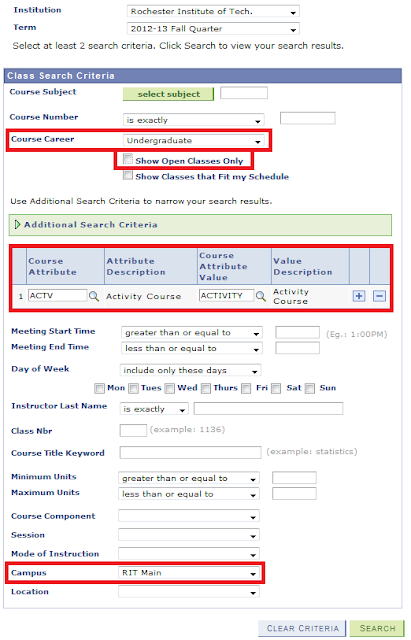
Method 1
- Log in to the Student Center via http://sis.rit.edu
- Click the Search for Classes button in the top right corner of the Student Center.
- To search for all open and closed Wellness classes, enter the following information:
- Course Career = Undergraduate
- Show Open Classes Only = unchecked
- Course Attribute = ACTV
- Course Attribute Value = ACTV
- Campus = RIT Main
- Click the Search button. This list displays all scheduled open and closed Wellness classes. To add a class to your shopping cart, click the Select button next to the class.

Method 2
- Log in to the Student Center via http://sis.rit.edu
- Click the Search for Classes button in the top right corner of the Student Center.
- Use the Course Career dropdown menu to select Undergraduate.
- Uncheck the Show Open Classes Only option.
- There are 8 types of Wellness classes you can choose from. Each has a unique 4-digit code that you can enter in the Course Subject field. The types of wellness classes and their corresponding Course Subject codes are:
- 1107-- Health & Wellness Seminars
- 1108-- Dance
- 1109-- Fitness
- 1110-- Health & Safety
- 1111-- Lifetime Rec Activities
- 1112-- Interactive Adventures
- 1113-- Martial Arts
- 1114-- Military Sciences
- Once you’ve entered one of the 8 Course Subject codes, click the Search button. This list displays all scheduled open and closed Wellness classes for that type of Wellness class. To add a class to your shopping cart, click the Select button next to the class.
Subscribe to:
Posts (Atom)