Showing posts with label academic information. Show all posts

Monday, July 30, 2012

New eServices: Granting Third Party Access

Amongst the many changes happening at RIT, another change has been implemented just this week.  Old eServices has been done away with and the new student financial portal has been launched (http://www.rit.edu/eservices/).

If you are a returning student reading this you will remember granting your parents access to your student financial account when you were a freshman, probably before you even stepped foot on campus for orientation.  If you are a freshman, you have never gone through the process, so you will be signing your parents up for the first time.  Either way it is crucial that you follow the next few steps:

1. Students will need to send a request to their parents or 3rd party members or sponsors to grant them 3rd party access.  Student can do this by logging into eServices with their student account.

2. Next click on the add/delete access tab under the Navigation header (see image below).


3. Click "Add an account" and follow the directions.  Once students see the confirmation page, students will know a confirmation email has been sent to the 3rd party.

4. From the confirmation email, parents will be taken to a secure information page which they will be asked to fill out.

Note: Unlike the old eservices where parents needed to remember their email and password, parents will now have an RIT account and password.  It will not necessarily function as a typical RIT student account but parents will log into the account using this user name, not their email.

5.  When the form is complete and the 3rd party has agreed to the "Terms and Conditions", they will set up their computer account.  This account will be used to log into eServices in the future.

6. There is a Part 2 to the process which includes verifying that the 3rd party member knows the student.  This must be done through the 2nd link in the original email.  If the email has been lost or deleted, students can resend the email through the "Add/Delete Access" page and select edit and then hit the envelope.


7. After 3rd Parties have clicked on the second link, they will be asked to confirm the students date of birth and University ID number. 

8.  After this has been completed, 3rd Party members will have access to the new eServices and their student's financial information.  It is important to note 3rd party members can change their password the same way students can, by going to start.rit.edu.  From here they can change both their alternative email and password.  

Tuesday, May 8, 2012

Everything in ONE Place

Unlike the old SIS, the new system has everything you may need to see (with the exception of Access Services and MyCourses), in one consolidated system.  The system allows you to enroll in your classes, plan out your time at RIT, request documents, apply for graduation, check your GPA, see your class schedule, and coming during the 2012-13 academic year, a degree audit system that will work for all majors throughout RIT will be integrated.


Where do I find my academic information?

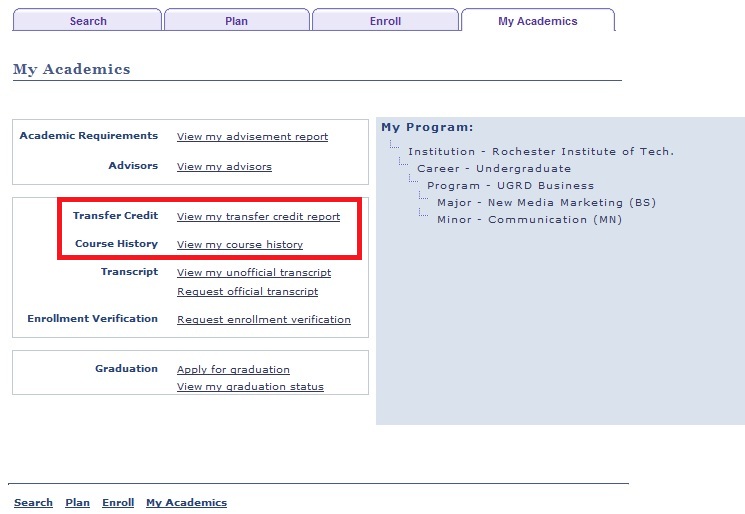
When students enter Student Center, they simply need to click on My Academics, which is located under Academics below Search, Plan, Enroll.  If you are already in either Search, Plan, or Enroll you can click on the My Academics tab from that screen.


Unofficial Transcript
 
Students now have access to a formal unofficial transcript within minutes (depending on the download speed of your computer).

From the My Academics page, students can select View my unofficial transcript.  From here, students can also request an official transcript from their academic department or advisor.  The unofficial transcript will be a downloadable document that students can use for their own personal purposes but it is important to remember this is an UNofficial transcript.


Past Course Information

Under the My Academics tab students can also view all the courses they have taken and view transfer credits.


Apply for Graduation

Students also have the ability to apply for graduation with in this system.  This can be done when a student is within four quarters of graduation.  Students can also check the status of their graduation application.


Enrollment Verification

For the purposes of taxes and financial aid requests outside of RIT, you can request your enrollment verification within this system.  This link is located under the Transcript heading in My Academics.


My Program

In this system students have what is known as a career (undergraduate or graduate), a program (your college), and your declared major and minor (if you have declared one).  Students can have multiple program plans if they are a part of multiple colleges and/or majors. You can see this on the side of the My Academics page.


Advisors

Within the My Academics tab there is a link to your advisors.  You can send a direct message to him or her by clicking on the View my advisors link.  This will take you to a page that allows you to select one or multiple advisors to notify and directly message within the system.  If they respond, the email will go to the student's RIT email address listed in the system.  The message center will also copy your RIT email address into the conversation, if you choose.