How does the wait list work?
When you are adding a course to your shopping cart, check the 'Wait list if class is full' if you would like to add a course to the wait list. When you enroll, read the message to see if you have been placed on the wait list, and to see what your position number is. If a spot becomes available in the class, the system will automatically enroll the first positions from the wait list into the class.
How can I check my position number?
When you view 'My Class Schedule' your status will say 'Waiting' if you are on the wait list. You can find what position you are right next to that, under 'Wait list Position.'
Where can I find how many people are on the wait list?
Use the class search to find the specific class, click the blue class link for more class information. Under 'Course Availability' you will find the wait list capacity, as well as the wait list total.
Why can't I wait list a specific class?
Not all classes have wait lists. If an academic department has decided not to utilize wait lists, the wait list capacity in the course description will say '0.'
How will I know if I get in?
At this time, you will have to check your student account periodically to see if you get into a class.
Can I set up a swap with a class I am wait listed for?
Unfortunately you cannot set up a swap with a class you are currently enrolled on the wait list for. How you choose to deal with enrolling in different sections or possibly losing a few spots on the wait list to set up a swap, is up to every student individually.
I'm spot #_, what are my chances of getting in?
There is no definite answer for knowing whether or not you will get in. The higher the spot you are, or if there is a reserved capacity that will be lifted and is not full, the better your chances. Check back periodically through out the summer to see if your position has changed.
I set up a swap, and now I want to drop one section of it. Why is it asking me to drop both classes?
Although it takes you to a page that seems like you are dropping both sections, when you select 'Finish Dropping' it only drops the section you have selected.
Showing posts with label Laura C. Kelley. Show all posts
Showing posts with label Laura C. Kelley. Show all posts
Wednesday, May 2, 2012

Friday, April 27, 2012
How do you Swap a Class in the new SIS?
If you would like to swap a class, do as follows:
1. Go to the 'Enroll' tab, then click 'Swap'
2. Choose the class that you are currently in that you would like to swap in the first field.
3. In the second field, choose the one you would prefer to be in if you can successfully enroll.
 The second choice class can come from the class search, your planner, your shopping
cart, or you can enter the 5 digit course code and then click ‘Select.’ The image above shows a swap that is set to swap from the shopping cart, so you would click the highlighted select. If you were to use the other options, you would hit the appropriate select.
Please note, you cannot use swap with a class you are currently on the wait list for. If you are spot 1 and a spot opens, if the class will put you over credits, you have a time conflict, or you are already in another section of the course, it will skip over you on the wait list. If you get put on the wait list, and know you would like to set up a swap, drop the class right away, enroll in your placeholder class, and set up the swap as shown above.
1. Go to the 'Enroll' tab, then click 'Swap'
2. Choose the class that you are currently in that you would like to swap in the first field.
3. In the second field, choose the one you would prefer to be in if you can successfully enroll.

Please note, you cannot use swap with a class you are currently on the wait list for. If you are spot 1 and a spot opens, if the class will put you over credits, you have a time conflict, or you are already in another section of the course, it will skip over you on the wait list. If you get put on the wait list, and know you would like to set up a swap, drop the class right away, enroll in your placeholder class, and set up the swap as shown above.
Wednesday, April 25, 2012
Now That the New SIS is Live: Part Four
Even though you have placed classes in your shopping cart, that does not mean that you are enrolled. At this time, there is no auto-enroll functionality in the new SIS. As soon as your enrollment appointment opens, you can begin enrolling straight from your shopping cart! Shortly before your appointment opens, we suggest you re-validate your cart and check to see if classes have filled up in the time since you have set up your shopping cart!
Log into Student Center, through the infocenter homepage, the same way you have to prepare. Click 'enrollment shopping cart' on your page.

This will take you to your shopping cart, from here you can select which courses you want, and click 'enroll.'
 You can see the above cart has all open classes, but be sure to check the status to see if that is the case for your individual shopping cart. A green circle means open, a yellow triangle means you will have to wait list, and a blue square means that the class and wait list are full. See the cart below for an example of a class that has a wait list status:

Make sure to keep clicking through to finish enrolling in the courses:
 Then, be sure to read the messages you receive.
If you have successfully enrolled, you will receieve this message:

If you have been placed on the wait list, you will receive the following message, which includes your wait list
position:

If the class has filled, is restricted to a group you are not a part of, has reserved capacity for a group you are not part of, or if there is any other reason you cannot enroll, you will receive a red x and a description of why you cannot enroll:


If you have any other questions, feel free to ask in the comments section!
Log into Student Center, through the infocenter homepage, the same way you have to prepare. Click 'enrollment shopping cart' on your page.

This will take you to your shopping cart, from here you can select which courses you want, and click 'enroll.'
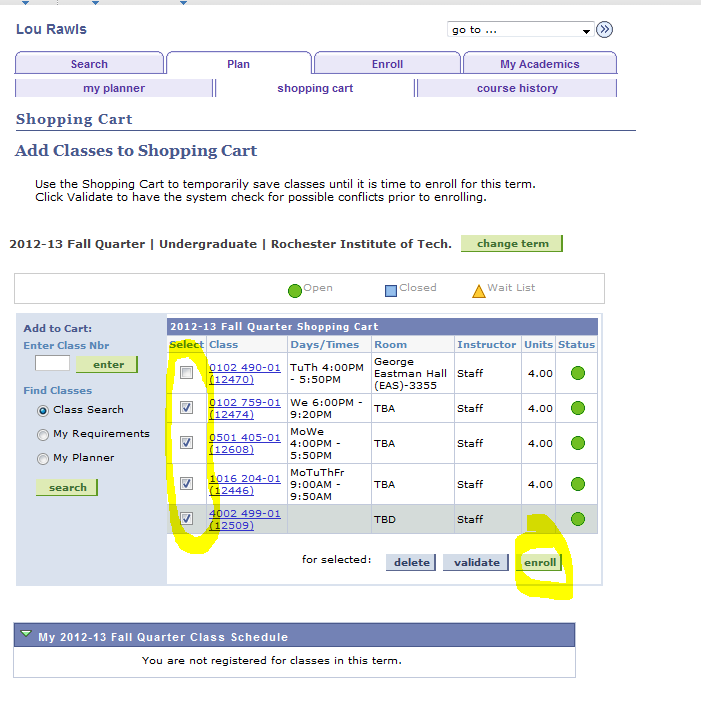

Make sure to keep clicking through to finish enrolling in the courses:

If you have successfully enrolled, you will receieve this message:

If you have been placed on the wait list, you will receive the following message, which includes your wait list
position:

If the class has filled, is restricted to a group you are not a part of, has reserved capacity for a group you are not part of, or if there is any other reason you cannot enroll, you will receive a red x and a description of why you cannot enroll:


If you have any other questions, feel free to ask in the comments section!
Wednesday, April 4, 2012
Why now?
We have noticed a lot of student concern regarding us launching an "unfinished system" and that we are using this as a trial on the entire student population. I would like to stress that this is in no way true.
The system that is launching is fully functional and complete as is. The reason that we are collecting feedback and prioritizing future changes is because we know that there will always be room for improvement. We are being cautious with this first launch, making sure students will be able to get help on campus during enrollment day and leaving extra time for students to learn the system. The technology of the old SIS was 40 years old, it needed an update.
So,
...why now? When the decision was made to convert to semesters, RIT found that it would take more resources to retrofit our old system instead of implementing a system with current technology. RIT had known for a long time that they wanted to update this technology, so this appeared to be the perfect time to commit to the switch.
...why not wait until semester conversion? Best practice is to change the system with information that RIT is familiar with, and we need to have a year in the new system before the change to semesters. Not only this, but students will experience many changes in the coming years, this will give you time to become proficient in this new system before the quarters change to semesters.
...why limit customizations? Every customization of the system will need to be addressed every time the system upgrades, which will require more resources, not only now, but also in the future. The first focus was on functionality, feedback is being collected and prioritized to make sure that student concerns are being addressed accurately.
...why are you making me use IE?! Oracle PeopleSoft only officially supports these browsers. The system is still functional in other browsers, but just know that IE 7, 8 or 9; Firefox 3.5, 3.6, and 7; and Safari 3, 4, and 5 are the only browsers that are officially supported. Personally, we have used the system successfully in other browsers.
Monday, April 2, 2012
Why do I need an Enrollment Appointment?
Let me start by clearing up some common misconceptions: your enrollment appointment is when you can begin enrolling-not a time slot you need to enroll during, NTID and Honors will still register early, and if a class fills up before your appointment begins, you can still go see an advisor or academic department for help.
At a university as large as ours, it is easy for the system to become overloaded during registration morning. With the old SIS, we are very familiar with the negatives this brings, such as the very unhelpful countdown, the constant refreshing, the many tabs and multiple browsers. There is a solution, however: stagger when students can begin enrolling. For this first go round (fall enrollment), students will be able to begin enrolling in 30 minute intervals starting at 7 a.m. and going through 5 p.m. This is to ensure that if you run into any problems that the institute will be staffed to help assist you. The times are still split by year level, like they are now, but within that the order will be determined randomly. Yes, we know this isn't ideal, but it is the fairest way for the RIT student population as a whole. Also, most other universities our size use enrollment appointments successfully.
The Genesis team looked into deciding this order by credits, GPA, or by other criteria. The issue with doing this is that it will often be the same students that are getting priority registration. What if you're the student who messed around freshmen year, got bad grades, but now you want to be a serious student? Why should that student continually fall towards the bottom? At the end of the day, random was the most fair to the entire student body.
Will enrollment always work like this? Not necessarily. This is our first launch of the system, feedback is being collected and changes will be made once all information is prioritized. We also are being extra careful not to overload this system for the first enrollment, so the amount of students per appointment may change in the future.
This is a big change for RIT, and honestly it will make RIT a little more of a real tech school. Give the system a chance, in the long run this will improve student's lives. Having all services use the same system will reduce confusion and create a better system for overall student profiles. If you have any questions or feedback, feel free to leave your input in the comments. RIT is doing its best to make this transition as smooth as possible, and we, student co-op's, are here to help in any way we can.
Wednesday, March 28, 2012
How does the new RIT SIS class search work?
Visit the new class search here: https://mycampus.rit.edu/psc/sasrch/EMPLOYEE/HRMS/c/COMMUNITY_ACCESS.CLASS_SEARCH.GBL?&
RIT's new class search launched in February 2012. It's been on the InfoCenter main page since then, but now that registration is nearing students are wondering how the heck it works. I'll tell you up front, the most confusing part? You have to use the numbers, NOT LETTERS, when browsing for courses (even though it defaults to show letters first).
The Genesis team is aware that this is not ideal, and believe me we appreciate the feedback about the system. Changing a system the size of RIT's SIS takes time however, and the project leaders have to prioritize what changes need to be made and will begin making updates as soon as possible.
The positive part of using numbers is that you're already familiar with them! For example, I'm a new media publishing major, I know my courses begin with 2083. If you are looking for possible classes and you know this code, you can just enter it into the field, instead of browsing through all the programs that you could care less about. The letters will take over the numbers as soon as RIT transitions to semesters.
Some other search fields you will now have include (but aren't limited to):
The advantage to all these options is when you have a really specific time and day that you would like to take a class (I.E. MW 2-4), you can limit your search to only find those. If you only want to take a class with your favorite professor, you can do so! At the same time, if you decided maybe you can be more flexible and you want more options in your search, just take away some of the variables and look through a longer list!
If you have any questions about the search, please ask anything you would like in the comments section, we will respond! This tutorial might help some students who are more visual - https://connect.rit.edu/scheduleofclasses/
RIT's new class search launched in February 2012. It's been on the InfoCenter main page since then, but now that registration is nearing students are wondering how the heck it works. I'll tell you up front, the most confusing part? You have to use the numbers, NOT LETTERS, when browsing for courses (even though it defaults to show letters first).
The Genesis team is aware that this is not ideal, and believe me we appreciate the feedback about the system. Changing a system the size of RIT's SIS takes time however, and the project leaders have to prioritize what changes need to be made and will begin making updates as soon as possible.
The positive part of using numbers is that you're already familiar with them! For example, I'm a new media publishing major, I know my courses begin with 2083. If you are looking for possible classes and you know this code, you can just enter it into the field, instead of browsing through all the programs that you could care less about. The letters will take over the numbers as soon as RIT transitions to semesters.
Some other search fields you will now have include (but aren't limited to):
- Online/in person - drop down in 'Mode of Instruction'
- Days of the week
- The time the class meets
- Professors last name
- Attributes - which include honors, access services, and activity (wellness) courses among others.
The advantage to all these options is when you have a really specific time and day that you would like to take a class (I.E. MW 2-4), you can limit your search to only find those. If you only want to take a class with your favorite professor, you can do so! At the same time, if you decided maybe you can be more flexible and you want more options in your search, just take away some of the variables and look through a longer list!
If you have any questions about the search, please ask anything you would like in the comments section, we will respond! This tutorial might help some students who are more visual - https://connect.rit.edu/scheduleofclasses/
Tuesday, March 27, 2012
Introduction: Laura C. Kelley
Hello world! My name is Laura Kelley, I’m a 4th
year new media publishing major that actually graduated after winter quarter,
but I didn’t want to leave RIT, so I stuck around for spring quarter! I came on
board the Genesis project to help out with social media and student training
efforts, strategizing how to best reach the RIT student population. While I’m
an avid Twitter (@raradee) and Facebook user, I knew I needed to jump in and
learn all about Reddit as well. While I’m no Redditor yet, I bet I’ll be there
by the time I’m done with this co-op!
I’m originally from Broomfield, CO (which is right between
Denver and Boulder) and came to RIT as an advertising and public relations
major living on photo house. I changed my major to new media publishing during
my second year and since then I have completed two other co-ops, one at Canon
and one at Post Central. I look forward to helping you all learn the new system
and inform you of all the new features!
Subscribe to:
Posts (Atom)